AMODIT Performance Monitor
June 14, 2022
New Features
Performance
Administration
AMODIT supports flexible document workflows, but the same flexibility requires careful configuration. Inefficient rule code or poorly selected job intervals can slow the system for every user. The Performance Monitor helps administrators find the source.

Find Performance Problems Early
One source of slowdowns is inefficient rule code, especially recurring rules that run at short intervals. Another is dictionary synchronization across a very large number of items. Early feedback lets administrators improve rule code, adjust job frequency, add database-column indexes or set limits for attachment sizes and the number of emails sent in one job run.
AMODIT system logs can contain errors and warnings caused by unavailable external sources or incorrect rules. Quantitative analysis can reveal anomalies, such as a sudden increase in errors across many users after a rule update, and support a faster response.
Performance Monitor
The AMODIT Performance Monitor is an additional module that records metrics about system operation. It is designed for:
- customers with on-premises AMODIT installations;
- people who design processes, rules and reports on the customer, Astrafox or partner side;
- service teams responsible for continuity on the customer or Astrafox side.
The module brings previously separate performance tools together and gives a system administrator a consolidated view of key operations.
Recorded Operations
The monitor represents the state of a business operation—an identifiable AMODIT activity initiated by end users or directly affected by their configuration choices. Recorded operation types include:
- running any type of case rule;
- running a recurring job;
- synchronizing dictionaries;
- executing selected functions in case rules, such as
CallRest; - loading report data;
- loading a case list;
- sending an attachment to the SkanujTo service.
Administrators also influence the number and quality of operations by creating rules and code, defining reports and views, and setting job frequency.
Recorded Metrics
- number of operation calls in the measurement interval;
- average, total and maximum execution time;
- percentage of the interval spent on the measured operations;
- number of code exceptions;
- number of recorded timeouts;
- the component that recorded the operation, such as the website for manual, automatic and table rules or the asynchronous service for recurring rules, dictionary synchronization and email loading.
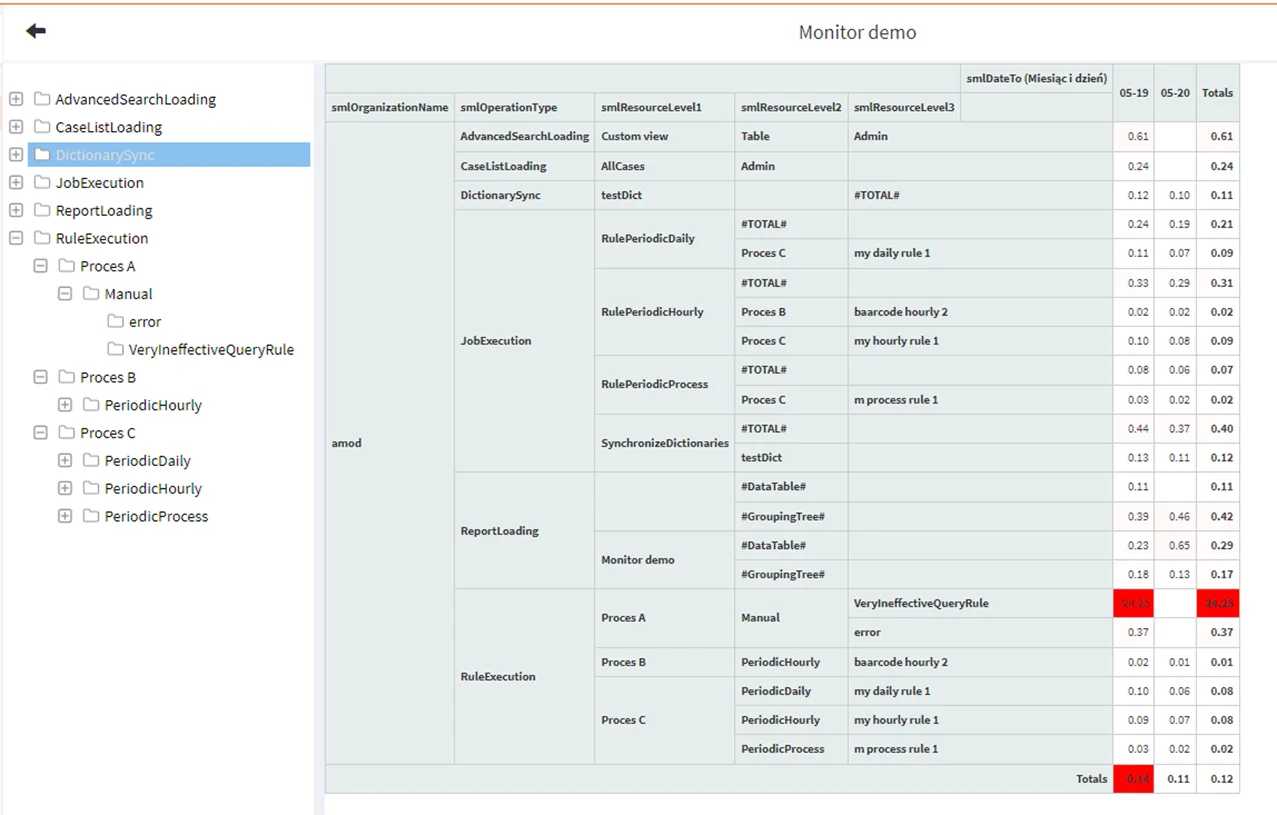
The example pivot report uses a heat map to show the share of execution time for operations over two days. The manual rule VeryIneffectiveQueryRule is highlighted in red at 24.25%, illustrating how the monitor identifies an inefficient operation associated with a slowdown.
Using the Monitor
The monitor writes collected data to the systemmonitorlog table. Administrators can review it through the AMODIT reporting module, for example by creating a report based on an external source. Users can work with predefined reports or create their own from other sources.
The feature is available in the Enterprise version.
Review AMODIT Performance
Discuss diagnostics, recurring jobs, rules and reports for an AMODIT environment.