

Database-to-Server File Migration
February 26, 2015
New Features
File Storage
Administration
AMODIT can migrate files between database storage and a server disk. This historical article explains both configurations and presents measurements from an example migration.

AMODIT supports two file-storage configurations:
- files stored in the database;
- files stored on the server disk, with only search indexes kept in the database.
Each mode has advantages and tradeoffs.
Files Stored in the Database
- Advantage: database mechanisms maintain file consistency.
- Advantage: files cannot be accessed outside the database.
- Tradeoff: a larger database makes backups harder and can affect performance.
Files Stored on the Server Disk
- Advantage: a smaller database.
- Advantage: simpler incremental backups because every file is stored separately.
- Tradeoff: files can be changed outside AMODIT, creating a data-consistency risk.
Files can be migrated between the database and disk. The migration is provided as a paid service. The following measurements come from one example migration.
Database Parameters
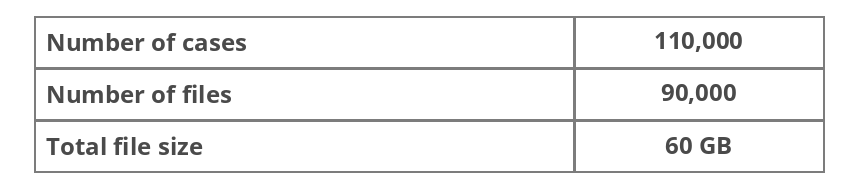
Migration Operation

Measured Results
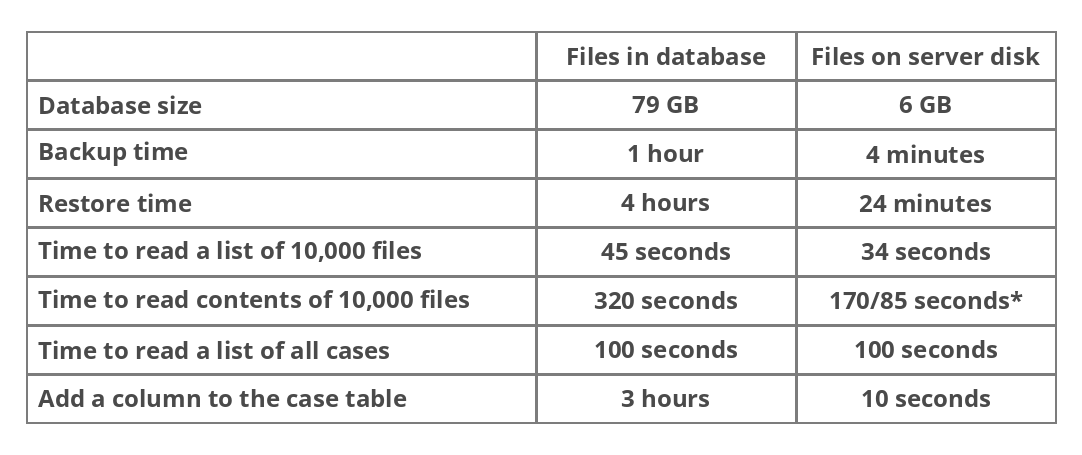
* First read and subsequent reads. Read times improve because of operating-system file caching.
The tests used a server with two Intel Xeon E5620 2.4 GHz processors, 16 GB RAM and Windows Server 2008 R2 Standard 64-bit.
Conclusions
In this historical test, moving files to disk reduced the database from 79 GB to 6 GB. The database backup fell from 1 hour to 4 minutes, while restore time fell from 4 hours to 24 minutes. Reading 10,000 files took 45 seconds from the database and 34 seconds from disk on the first pass; reading the contents took 320 seconds from the database and 170 or 85 seconds from disk. Creating a list of all cases took 100 seconds in both configurations, while adding a column to a table with cases fell from 3 hours to 10 seconds.
The results show a smaller database, shorter database backup operations and faster file reads without involving the database engine. Some database administration operations also became substantially shorter in this test environment.
Review File Storage Options
Discuss the current storage configuration and migration requirements with the AMODIT team.