

Scanning and Barcodes
April 8, 2014
Features
Barcodes
Scanning
AMODIT includes a set of features for handling barcodes in scanned documents. This article describes the corresponding system settings.

Most barcode features have related system settings:
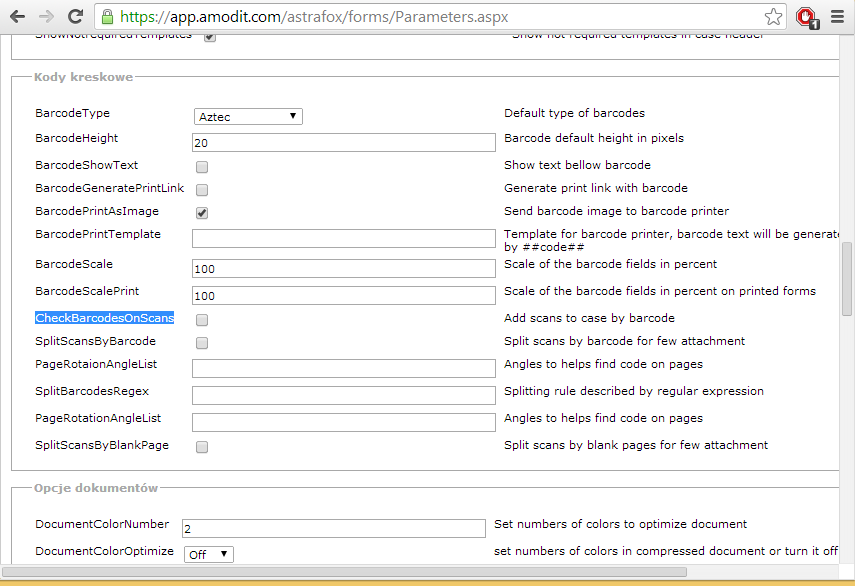
The main settings are:
- CheckBarcodesOnScans: AMODIT searches new scans for barcodes. When it finds one, it looks for a case with the same code in its title. A rule must first place that code in the case title. Teams can attach barcodes to documents while creating cases with matching codes; after batch scanning, AMODIT assigns the documents to the corresponding cases.
- SplitScansByBarcode: splits multipage scans at barcode pages, assuming the barcode appears on the first page of each document.
- SplitBarcodesRegex: accepts a regular expression that identifies which barcodes should split a large scan. For example,
AM\d{6}matches AM followed by six digits. - PageRotationAngleList: defines page rotations used while searching for a barcode. Recognition normally expects a roughly horizontal barcode. A value such as
10,-10,20,-20tries 10 degrees clockwise and counterclockwise, then 20 degrees. Keep the list short to limit the performance cost. - SplitScansByBlankPage: splits a scanned batch at blank pages. It can separate invoices divided by blank sheets, although it does not automatically assign them to cases.
Review a Scanning Workflow
Discuss barcode recognition, batch splitting and case assignment for your document process.