

Invoice and Purchase Order Matching
January 8, 2019
Features
Features
Invoice Workflow
Case Study
A large international manufacturer received several thousand invoices each month from multiple countries. Employees classified every document and compared it with requisitions, orders and warehouse receipts even though more than half of the cases were a 100% match. The objective was to automate routine matching and focus employees on exceptions.

We receive several thousand invoices each month from many countries. A team classifies them and checks each category against our requisitions, purchase orders and goods receipts. Our statistics show that more than half are a 100% match, yet every case consumes employee time. We want the document workflow to classify invoices, identify complete matches and leave employees to resolve differences.
Solution
After analyzing the requirement, we configured an AMODIT process with extensive integration to the customer's ERP. The customer knew the ERP data structure well, which supported preparation of the SQL queries required to retrieve the relevant data sets.
Implementation Benefits
Automation reduced the time spent verifying matching invoices and let the team focus on discrepancies. Stakeholders gained a register showing every invoice and its current status, supporting supplier communication and exception resolution. Automated ERP registration also reduced rekeying into the accounting platform.
The process reads invoice data, classifies the document and reports a match or the differences between the invoice, requisition, order and goods receipt. Employees review OCR exceptions and approve registration.
Process Functions
- automatic registration of invoices received by email or scanner;
- automatic extraction of invoice data in Polish and English, with human verification when OCR confidence requires it;
- classification based on extracted data and comparison with ERP records;
- retrieval of the appropriate ERP data set for the classification, including requisition lines, one or more purchase orders and one or more goods receipts;
- application of the relevant comparison algorithm at several levels:
1. invoice amount against the requisition, order or goods receipt amount;
2. total invoice quantity against the total requisition, order or goods receipt quantity;
3. number of invoice lines against the corresponding number of lines;
line-level quantity and unit-price matching; - routing each discrepancy to a designated team when the comparison identifies quantity or price differences;
- registration of data in the ERP through an intermediate table;
- archiving the invoice scan and key data in the customer's SharePoint environment.
The central design principle is maximum automation of routine work and clear transfer to an employee after the platform classifies the case.
Process in Practice
- An employee scans the invoice.
- The platform registers the invoice and extracts its data automatically, with employee verification when OCR requires it.
- The extracted data drives classification and comparison with ERP data.
- The AMODIT case form shows the invoice, extracted fields and the related requisition, order or goods receipt lines from the ERP.
- After assessment, an authorized employee selects Register. AMODIT posts the invoice to the ERP. When discrepancies exist, the ERP exception process begins, and the invoice plus selected data are also archived in SharePoint.
- AMODIT tracks ERP status changes so users can follow the invoice through reconciliation and accounting.
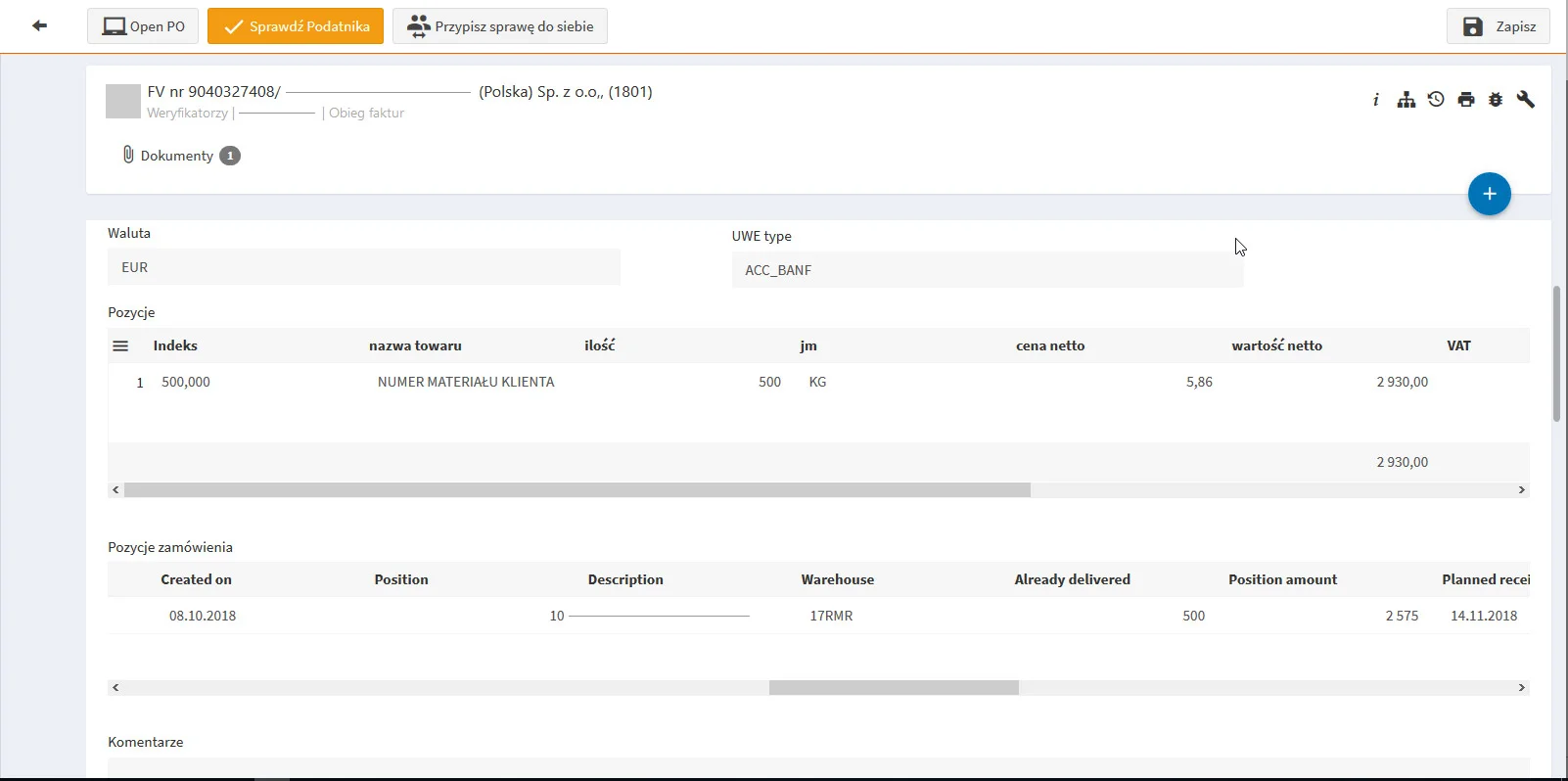
Figure 1. The UWE type field shows the customer's classification result, with purchase order lines displayed for verification.
This process fits organizations that receive many invoices, issue many purchase orders and need to match delivered goods or materials against requisitions and orders. The implementation described here was completed for a large international manufacturing company.