

Data Security Controls
September 1, 2022
Features
Security
Access Control
AMODIT can contain sensitive information. Protecting it requires controls for internal access as well as safeguards against external attacks. This historical overview presents the security capabilities described for the platform.

User Authentication
Each AMODIT user has an account identified by a login and password. For manually created accounts, administrators can configure strong-password requirements, password expiration and comparison with the previous 10 passwords.
Administrators can also set an inactivity timeout that signs out an idle user and restrict access to selected IP addresses.
External Identity Providers and MFA
In addition to login or email and password, AMODIT supports authentication through Google, Facebook or Microsoft when the email address matches the account in AMODIT. Those providers can add multi-factor authentication. SAML and OpenID configurations are also available, including integration with Azure AD.
Permissions at Multiple Levels
Access depends primarily on user permissions. By default, an ordinary user receives access to cases assigned directly, assigned through group membership or previously handled by that user. Additional permissions can be configured in the user profile, at process level, for an individual case, in form-field settings and specifically for document fields.
Encryption for Files and Fields
The basic encryption mechanism protects text stored in the AMODIT database and files stored inside or outside the database. It protects against direct access from the server side: database or file administrators see encrypted values or files rather than readable content.
The encryption key can be stored in three ways:
- in the AMODIT database — the lowest of the three protection levels;
- in the registry — the middle level;
- as an encrypted key in the registry — the highest level.
This basic mechanism protects data outside the application. It does not restrict authorized AMODIT users from seeing decrypted values in the application.
Sensitive Data Protection
The additional sensitive-data module encrypts values and also restricts access inside AMODIT. Direct database access shows encrypted values, while an authorized application user can read the data only after entering an individual password.
Four-Eyes Approval for Administrative Changes
The four-eyes rule covers selected system-setting changes, user creation and group membership management. When enabled, a change made by one administrator requires confirmation by another administrator.
Protection Against Web Attacks
AMODIT is a web application. The source article describes penetration testing and controls addressing SQL injection, cross-site scripting and clickjacking. Some controls are built into AMODIT, while others depend on the application-server configuration.
Blocking HTML in Text Fields
A configurable mechanism prevents HTML content from being interpreted in selected read-only text fields. HTML or JavaScript entered in such a field is displayed as text, with angle brackets encoded before storage.
Blocking File Extensions
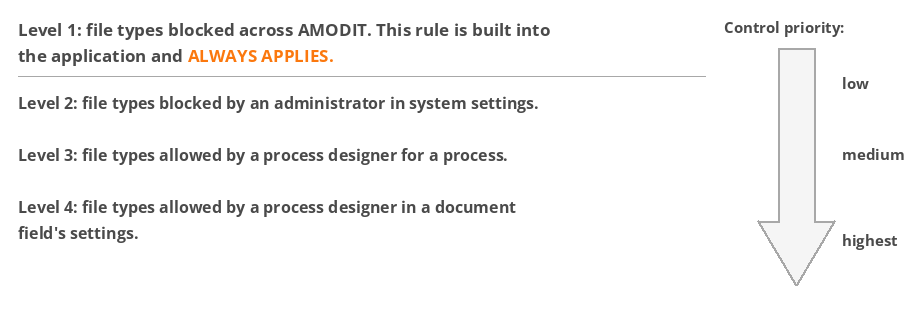
AMODIT can block or allow selected attachment extensions. A system-wide baseline blocks certain file groups. Administrators can add system-wide restrictions, while process designers can allow selected file types at process or document-field level.
Auditability
AMODIT records user actions related to cases and application administration, including form changes, case activity such as opening a case or downloading an attachment, process-definition changes, user-account changes and use of the Log in as function.
The activity record shows who performed an action and when, supporting investigation and evidence in disputed situations. Security still depends on the complete deployment, server configuration, access model and operational procedures.
Review Security Requirements
Discuss the controls, configuration and evidence required for an AMODIT deployment.