Skip to content
Search

What are you looking for?

Enter at least 3 characters.

AMODIT · add-on module

AMODIT Forms Portal: public request forms that open a case in AMODIT the moment they are sent

Forms Portal is an add-on module for AMODIT that takes in requests from people who have no account in the system. A customer, job applicant or supplier fills in a form on your company’s own web address — no login needed, and anonymously if you allow it — and AMODIT starts a new case in the right process.

Typical requests sent through a form:

  • requests for quotation and pricing
  • complaints and returns
  • service requests and fault reports
  • job applications and supplier registration
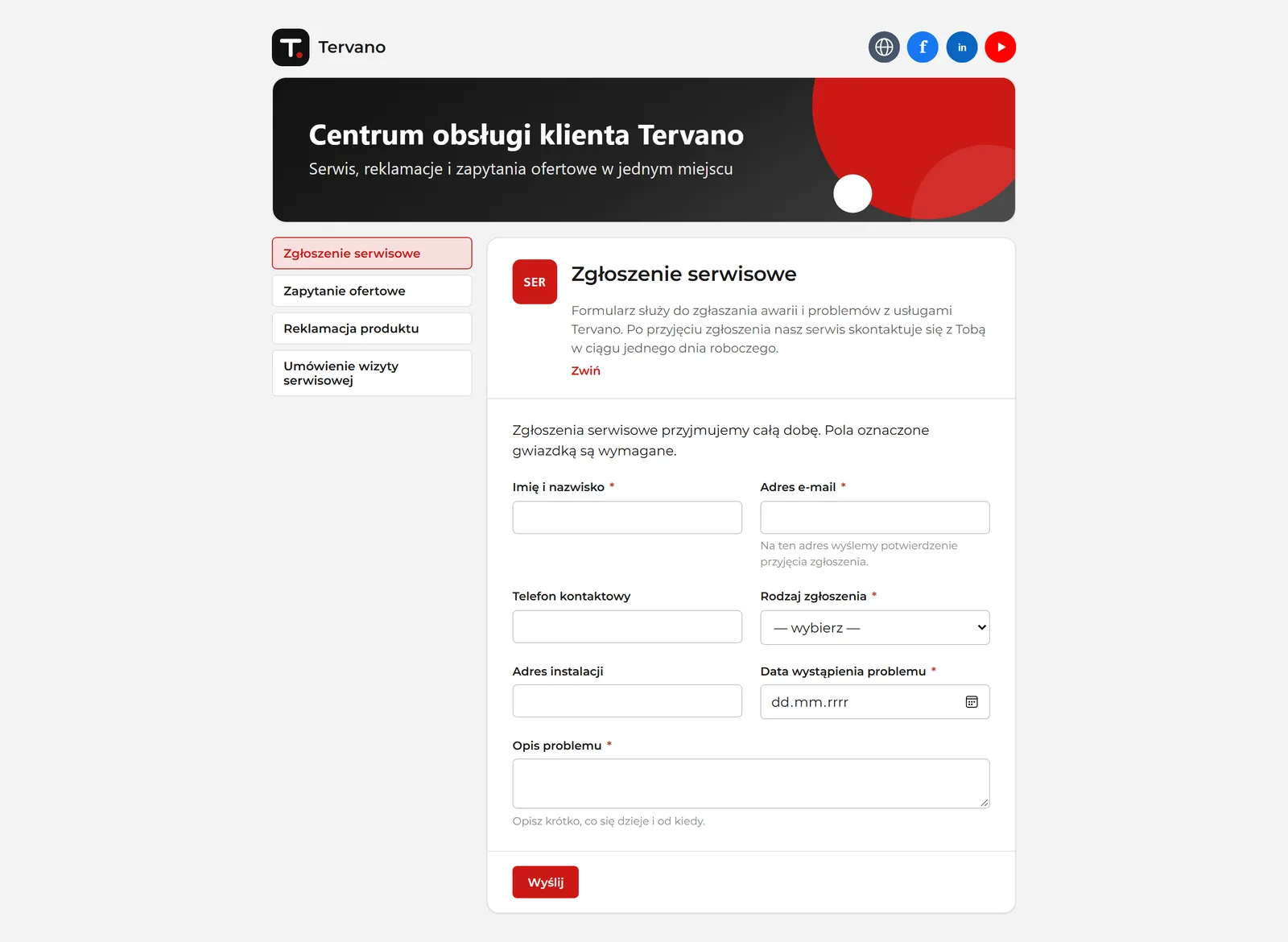
Public service request form built in AMODIT Forms Portal, with the company logo and banner, a menu of other forms on the left and request fields that can be completed without logging in(opens enlarged view)
What the requester sees: your logo, banner and colours, plus a list of other forms they can use.

External requests without re-keying

Today: email, phone calls, spreadsheets

Customers send emails, suppliers return spreadsheets, applicants phone in. Before anything happens, someone has to read each request, type the details into AMODIT and make sure nothing slips through the cracks.

With Forms Portal: the form opens the case

The module puts a form built on your AMODIT process on the web. The requester needs no account and no login. Clicking “Submit” creates a case at the chosen stage of the process, with every field already filled in and ready to be handled.

From an AMODIT process to a form on the web

Four steps for the administrator — no coding involved.

  1. Import the process definition

    The administrator exports the process from AMODIT and uploads the file to the portal, which reads its stages, sections and fields.

  2. Pick the starting stage and lay out the fields

    Choose the stage at which new cases should begin, then drag the fields you need onto the form page.

  3. Preview first, then publish

    A new form starts as a draft. Once you have checked the version external users will see, publish it at its own address and share the link — on your website, for example.

  4. A new case in AMODIT

    Every submission opens a case in the process. The submission log records the outcome and the number of the case created.

What AMODIT Forms Portal gives you

Benefits for the team that handles requests and for the people who send them.

Data entered once

Whatever the requester types goes straight into the case fields in AMODIT. Nobody copies details from emails or spreadsheets, so there are fewer errors and delays.

The form follows the process

Pick lists, mandatory fields and validation rules come from the AMODIT process definition, so you never design the form from scratch.

Requesters see only their fields

The form shows only the fields open to external users at the starting stage. The rest of the process data never leaves the server.

Set up without developers

The administrator configures layout, wording, validation and appearance in the browser by dragging elements into place.

A page that carries your brand

With your logo, banner, colours and fonts, customers see your company’s page rather than a system screen.

AI in the workflow

AI for requests coming in through forms

Example capabilities you can configure in the AMODIT process that receives the request.

Example AI scenarios

Forms Portal opens the case; the AMODIT process takes it from there. Your organization decides whether and at which stages AI is used, and who approves its output.

  • AI can suggest a request category — a complaint, a service call or a request for quotation — based on the description typed into the form.
  • AI can prepare a short summary of the request for the person who picks up the case.
  • AI can point out missing information before the case moves on to the next stage.

Oversight of decisions

For decisions about people and personal data, and wherever regulations require it, AI recommends and a person approves. In other processes, you can define automated decisions, rules, thresholds and exception handling.

Building the form

A builder where you drag fields into place

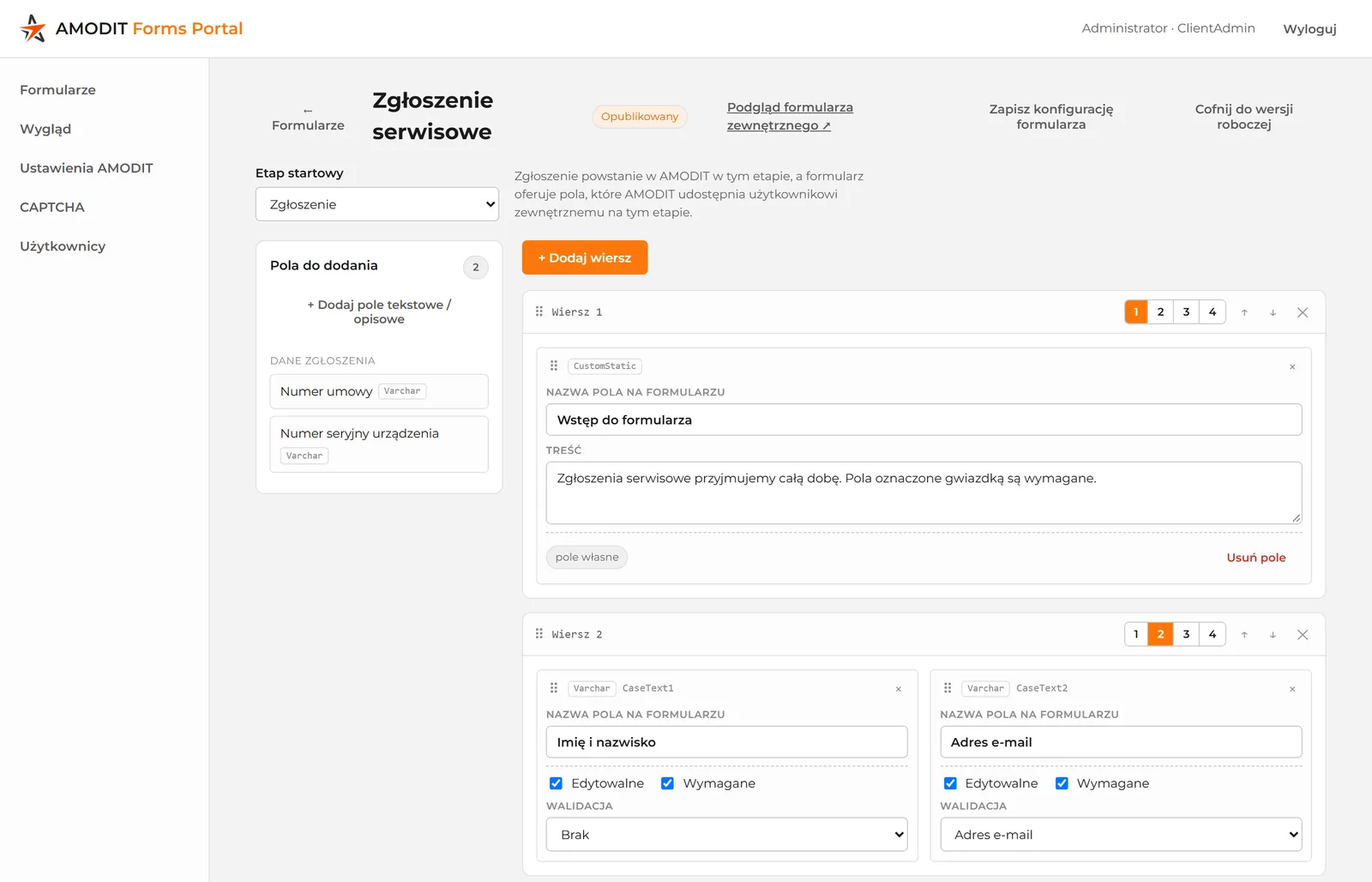
The builder lists the fields available at the chosen stage next to the layout area. You arrange fields in rows of one to four columns and, for each one, set the label requesters will see, whether it is mandatory or editable, and a validation rule: email address, phone number, digits only or a custom pattern.

  • Field types: short and long text, number, amount, date (with or without time), yes/no, pick list, a name field and a confirmation checkbox used in place of a signature.
  • Your own headings, hints and information notices, such as a privacy statement.
  • Changes to the AMODIT process do not break the form: upload the new definition and the field list refreshes while the starting stage, layout and labels stay as they were.
  • A form can be published once it has a starting stage and at least one field in the layout.
AMODIT Forms Portal form builder showing the starting stage selection, the list of available fields and the form layout with label, mandatory and validation settings for each field(opens enlarged view)
The form builder: starting stage, available fields and layout, with settings next to each field.

Appearance

Forms in your brand colours

Appearance settings apply to every form in a workspace, so each new form automatically matches the others.

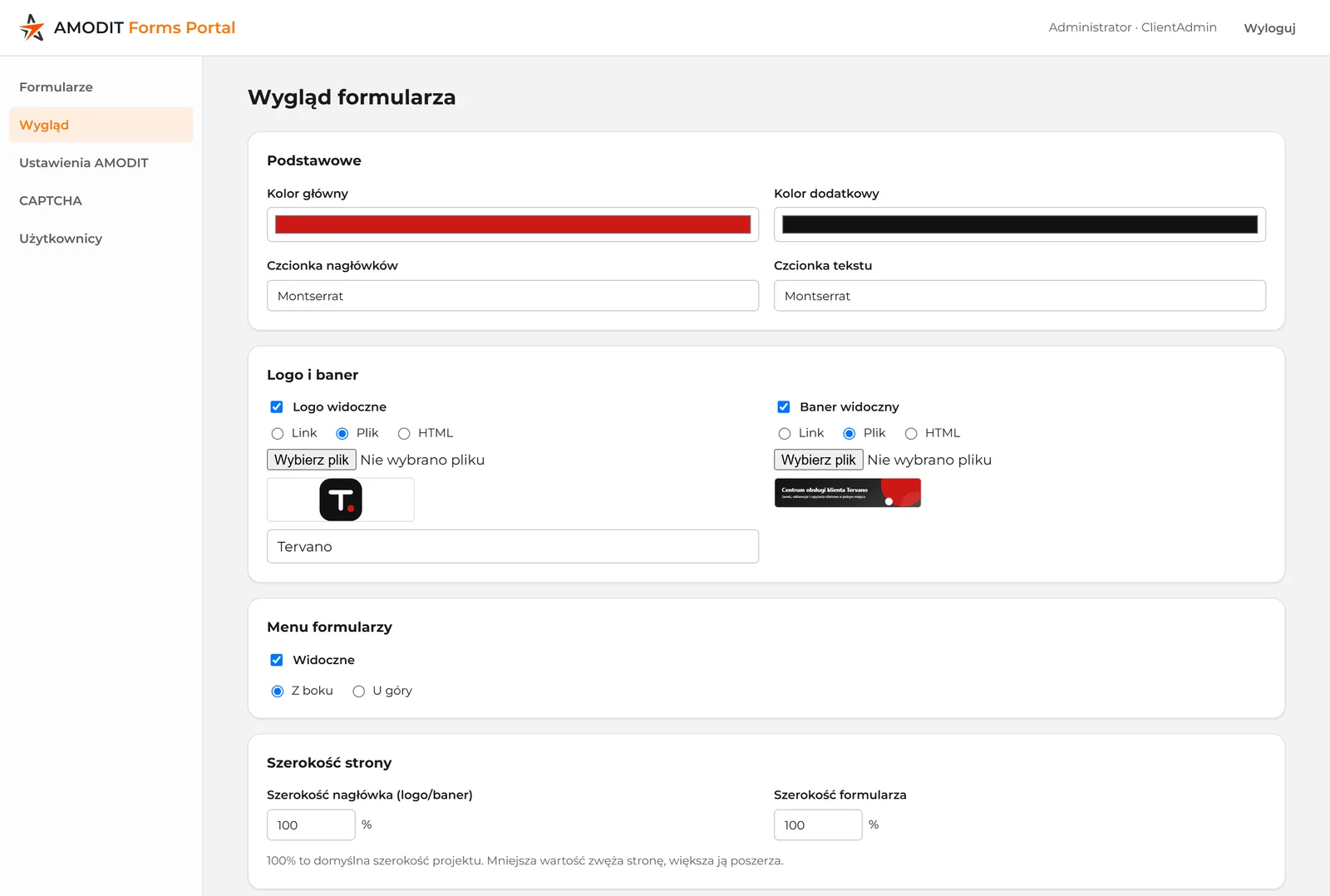
  • Logo and banner as a link, an uploaded file or your own HTML snippet, with optional text next to the logo, such as the company name.
  • Primary and secondary colours, heading and body fonts, header and form width.
  • A menu of other published forms at the side or top of the page — or no menu at all.
  • Show or hide the title, process description and submit button, and add links to your website and social media profiles.
  • Custom CSS for more demanding designs.
AMODIT Forms Portal appearance settings with primary and secondary colours, fonts, logo, banner, menu position and form page width(opens enlarged view)
Appearance settings: colours, fonts, logo and banner, menu position and page width.

Many forms

Every form in one admin panel

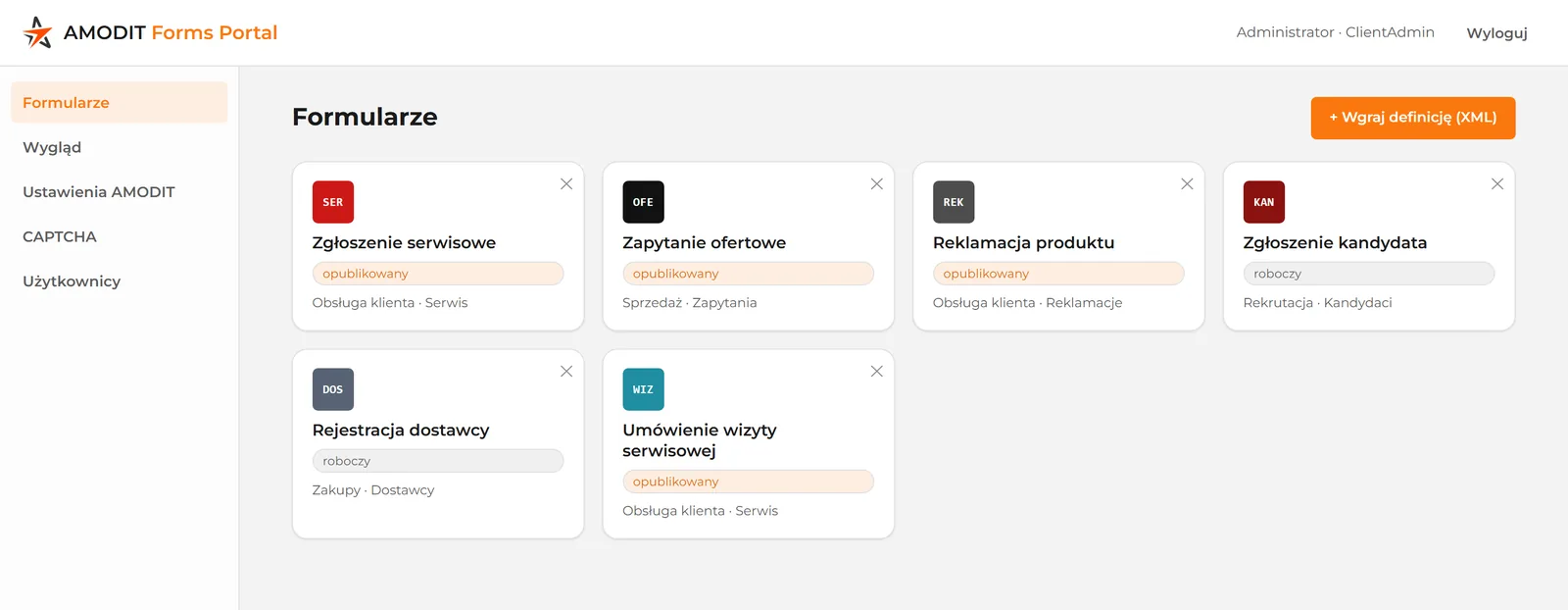
The admin panel lists your forms with their draft or published status and lets you upload another process definition from AMODIT. Any process that is started by someone outside the system can have its own external form.

When several branches use the module, or a partner rolls out AMODIT for several clients, each organization gets its own workspace: a separate form address, look and feel, AMODIT connection and team of administrators.

AMODIT Forms Portal admin panel listing forms with published or draft status and a button for uploading a process definition from AMODIT(opens enlarged view)
The admin panel: forms with their status and process definition upload.

Security

Bot protection and a record of every submission

Because anyone can open the form without logging in, the administrator chooses how visitors are verified. With protection switched on, the form cannot be sent without a correct answer.

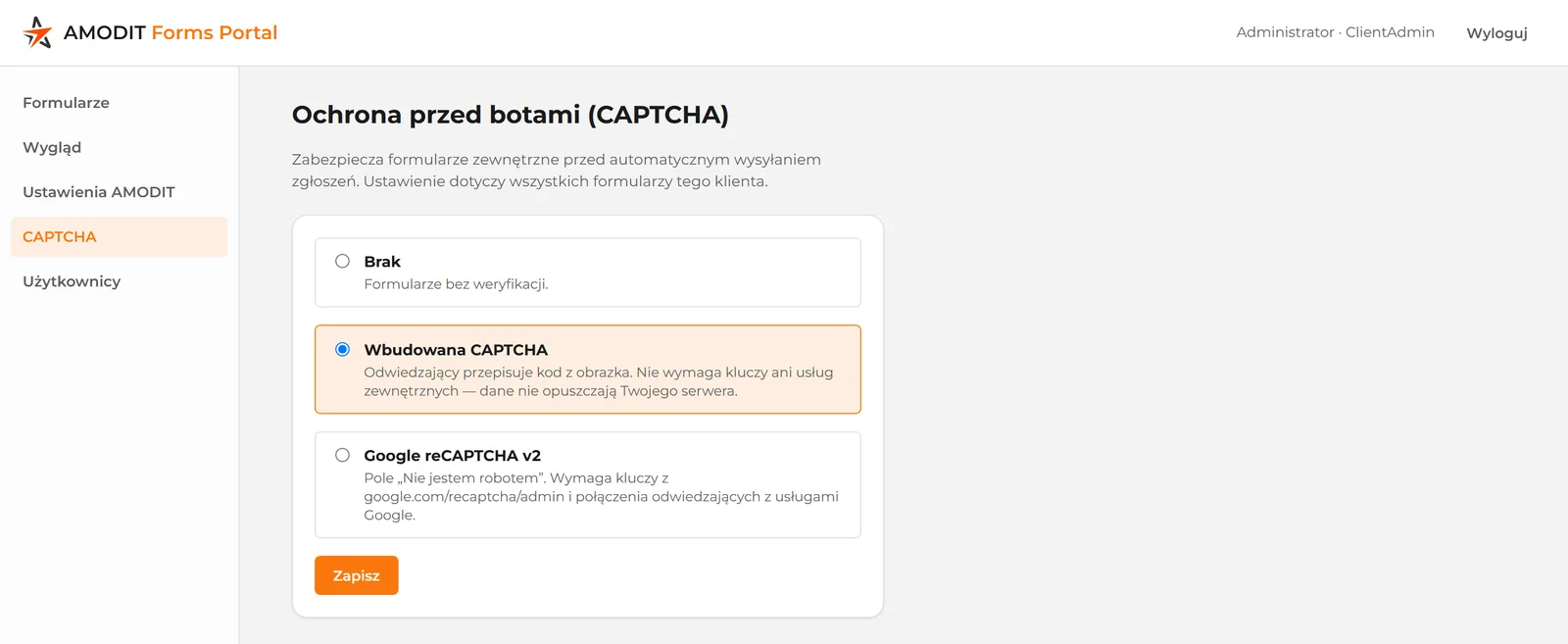
  • Built-in CAPTCHA — a single-use code shown in an image, with no keys or third-party services. It is basic protection: it stops simple bots but not software that reads images, and it has no audio version.
  • Google reCAPTCHA v2 — for forms more likely to be targeted.
  • Submission log — every attempt is recorded with its outcome (success or error) and the number of the case created in AMODIT.
AMODIT Forms Portal form protection settings with three options: no verification, built-in CAPTCHA or Google reCAPTCHA v2(opens enlarged view)
Bot protection: no verification, built-in CAPTCHA or Google reCAPTCHA v2.

Forms Portal, temporary access or external organizations?

Three AMODIT modules for people outside your organization, each for a different situation.

AMODIT Forms Portal

A public form at a permanent address. Anyone with the link can fill it in without logging in, and each submission opens a new case. Ideal for enquiries, complaints and reports — including anonymous ones.

Temporary access

Gives one named person access to a single existing case through a link and code, for a set period. Learn about temporary access.

External organizations

Ongoing collaboration with a company or institution whose users sign in to AMODIT with an agreed set of permissions. Learn about external organizations.

Requests a form can take in

Examples of processes started by someone outside AMODIT: a customer, applicant, supplier or visitor.

Sales and requests for quotation

An enquiry from a prospect lands in your AMODIT sales process instead of waiting in a salesperson’s inbox.

Show more
  • B2B request for quotation or pricing
  • product demo request
  • partner or distributor application
  • registration for a webinar, event or training session

Complaints and returns

Each complaint gets its own case, deadline and owner as defined in the process.

Show more
  • product or service complaint
  • return request
  • damaged shipment or delivery that does not match the order
  • compensation claim

Service and customer support

Fault reports arrive with all the details the service process needs.

Show more
  • equipment or service fault report
  • booking a technician visit
  • warranty defect and product registration
  • post-service satisfaction survey

Reports without personal details

A form does not have to ask for a name or email address. Your organization can accept anonymous reports, for example about irregularities.

Show more

Recruitment and HR

Applicant details go into the recruitment process without being copied from emails.

Show more
  • job application
  • internship or work placement application
  • employee referral
  • new starter details ahead of onboarding

Suppliers, visitors and facilities

Business partners and visitors register themselves, and the facilities team receives ready-made cases.

Show more
  • new supplier registration and qualification questionnaire
  • visitor pre-registration and pass request
  • building fault report
  • room booking by an external tenant

For IT and procurement

Implementation, security, integrations and cost scope

The key information needed to assess the solution before an implementation discussion.

Implementation and your team’s role

The form is generated from the definition of an existing AMODIT process, so there is no separate field analysis or coding. We agree the rollout scope with you — processes, workspaces and AMODIT API access.

Hosting and security

AMODIT can run in the Astrafox cloud or on your own infrastructure. The Astrafox information security management system complies with ISO/IEC 27001.

Explore AMODIT security

Integrations

Integrations are designed around your architecture. AMODIT can exchange data with ERP systems and other services used in the process.

Explore integration options

What drives the cost

The quote depends on factors such as the number and complexity of processes, users and legal entities, integrations, data migration, deployment model, training and the agreed support level.

See maintenance and SLA terms

What you need to get started

The building blocks for your first form.

A process in AMODIT

The process in which cases should be created, with a starting stage and fields open to external users.

AMODIT API access

API access to AMODIT must be configured on your side — this is how the form creates cases.

The Forms Portal module

Forms Portal is an add-on module for AMODIT and works only together with AMODIT.

A first request to move online

A good place to start is a request you currently receive by email, phone or spreadsheet.

Questions and answers

AMODIT Forms Portal: frequently asked questions

Does someone need an AMODIT account to submit a form?

No. The form opens at a public address and can be completed without logging in. Your organization decides whether to ask for contact details or to accept anonymous submissions as well.

How is Forms Portal different from temporary access?

Temporary access opens an existing case to one specific person for a limited time. Forms Portal publishes a form for anyone with the link, and each submission opens a new case.

Does Forms Portal work without AMODIT?

No. It is an add-on module for AMODIT: forms are built from AMODIT process definitions and create cases there. AMODIT on its own does not publish forms on the web or let you brand them — that is what this module adds.

Which field types can a form include?

Short and long text, number, amount, date (with or without time), yes/no, pick list, a user field and a signature confirmation. The user field is a plain name field, and the signature confirmation is a checkbox, not a qualified electronic signature. Report and table fields pull data from AMODIT, so on an external form they are for information only.

Where in the process is the case created?

At the starting stage chosen by the administrator. Each form creates cases at one stage of the process, and every submission is logged with its outcome and case number.

Book a free AMODIT demo

Tell us which requests you currently receive by email, phone or spreadsheet. We will show you how to move them to an AMODIT Forms Portal form.

  1. We call you back within 8 business hours and ask about the process you want to improve.
  2. We agree what to show: roles, documents and the systems involved.
  3. You see AMODIT in an online demo based on a scenario like yours.

Prefer to talk now? Call us: +48 22 355 21 64

What to include in your message: which requests come from outside (enquiries, complaints, service calls, applicants), who sends them and which AMODIT process should handle them

Book a free demo

0 / 2000 characters
Up to 5 files, no more than 10 MB each and 25 MB in total: PDF, DOCX, XLSX, CSV, TXT, PNG, JPG/JPEG or ZIP.
    Where did you first hear about us? (optional)

    Choose one answer.

    The controller of personal data submitted through this contact form is Astrafox Sp. z o.o., based in Warsaw. The data will be processed to respond to your message. You have the right to access, correct, restrict or erase your data, to object to its processing and to lodge a complaint with the supervisory authority. Details are available in the Privacy Policy.

    This site is protected by Cloudflare Turnstile and the Cloudflare Privacy Policy applies.

    No obligation. We use your details only to respond to this request.

    Select the image to switch between fit-to-screen and full-size view.

    Book a demo